> ## Documentation Index
> Fetch the complete documentation index at: https://www.marqeta.com/docs/llms.txt
> Use this file to discover all available pages before exploring further.
# Set Up a Webhook Handler
> Set up a webhook handler to monitor Marqeta events.
To track events such as transactions, case events, and chargeback state changes in the card network, you must implement an API service that listens to events from Marqeta.
You must setup the webhook handler before sending a `POST` request for a dispute.
In production, you will host this service on your own server.
When testing the service in your private sandbox, you must run the server locally and expose it to the internet through a secure tunnel.
There are many tools available to set up a secure tunnel, such as ngrok, Cloudflare Tunnel, or Tailscale Funnel.
This guide describes how to set up a secure tunnel using ngrok.
By the end of this guide, you will understand how to:
* Implement a testing webhook API for dispute events locally.
* Serve your webhook handler via ngrok for testing in the private sandbox.
* Send a `POST` request to the Private Sandbox environment.
## Prerequisites
Ensure that you have set up the following before beginning:
* A Marqeta account with access to the private sandbox
* Your program short code and base64-encoded credentials
* Node.js installed (if using the boilerplate app)
* An ngrok account with the CLI installed
## Implementing an API or webhook handler app
To receive and process Marqeta events, you must implement a local server app with a `POST` endpoint that listens for these events.
A single webhook handler can receive events from multiple services in the Marqeta platform.
### Installing a boilerplate app to handle webhooks
Marqeta provides you with a boilerplate app to test webhook handling.
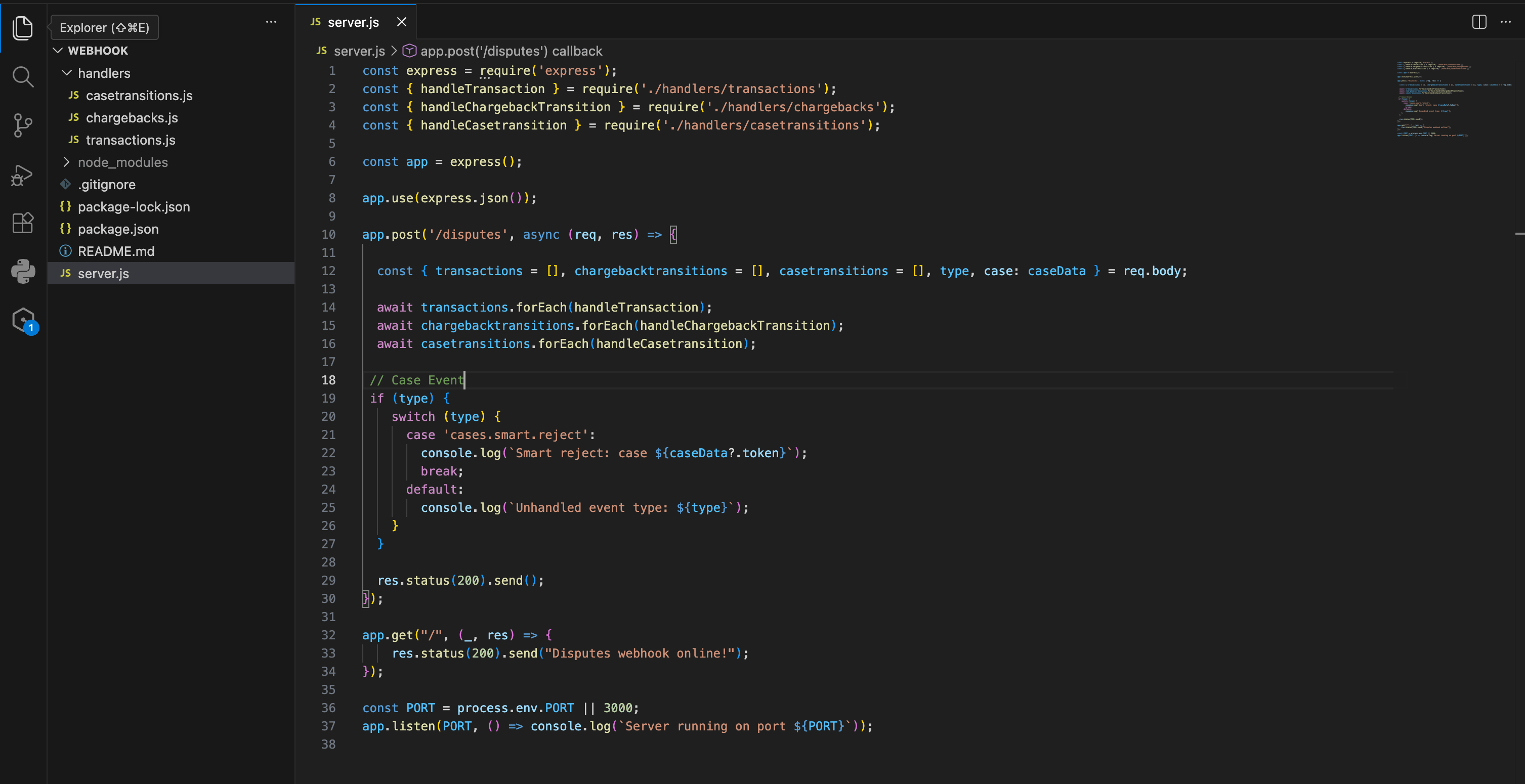 To download and run the app:
Download the Node JS Disputes webhook handler app by clicking [here](/assets/webhook-handler-app.zip). (ZIP file, 45 KB)
Install dependencies in the root directory using the command `npm install`.
Run the server locally with `npm run dev`
### Creating your own app to handle webhooks
If you do not want to use the Node JS Disputes webhook handler app, you can write your own code to implement a webhook handler app.
Your webhook handler must have a `POST` endpoint in a path of your choice, for example `/disputes`.
Send a `POST` request to this endpoint to complete setup of the Marqeta Webhook service.
### Listening for disputes events
For disputes handling, configure your endpoint to listen for these events:
```bash theme={null}
transaction.*
chargebacktransition.*
caseevent.*
casetransition.*
```
The `.*` wildcard subscribes your endpoint to all sub-events within each category.
When you configure your endpoint to listen for the events listed above, you will receive the following types of webhooks:
* **Transaction webhooks** -
Marqeta sends transaction webhooks whenever funds move between any entities on the Marqeta platform.
* **Chargeback transition webhooks** -
Marqeta sends chargeback transition webhooks during every state transition of a chargeback.
Marqeta triggers an event each time the status changes.
* **Case events webhooks** -
Case events represent actions that do not involve immediate money movement or standard status changes.
Examples include:
* Smart reject: When Marqeta rejects a transaction before it is submitted to the card network.
* Provisional credit: When a credit becomes permanent for Reg E cases.
* **Case transitions webhooks (optional)** -
These webhooks track internal state transitions from Marqeta.
They provide updates on case movements before a dispute is submitted to the card network.
This step is optional because your organization will initiate the API calls that trigger these transitions.
## Tunneling your server to the internet with ngrok
With your server running locally, you can expose it to the public internet by completing the following steps:
Create or sign in to your ngrok account and install the CLI.
Complete the initial steps in ngrok's [Setup Guide](https://ngrok.com/docs/getting-started).
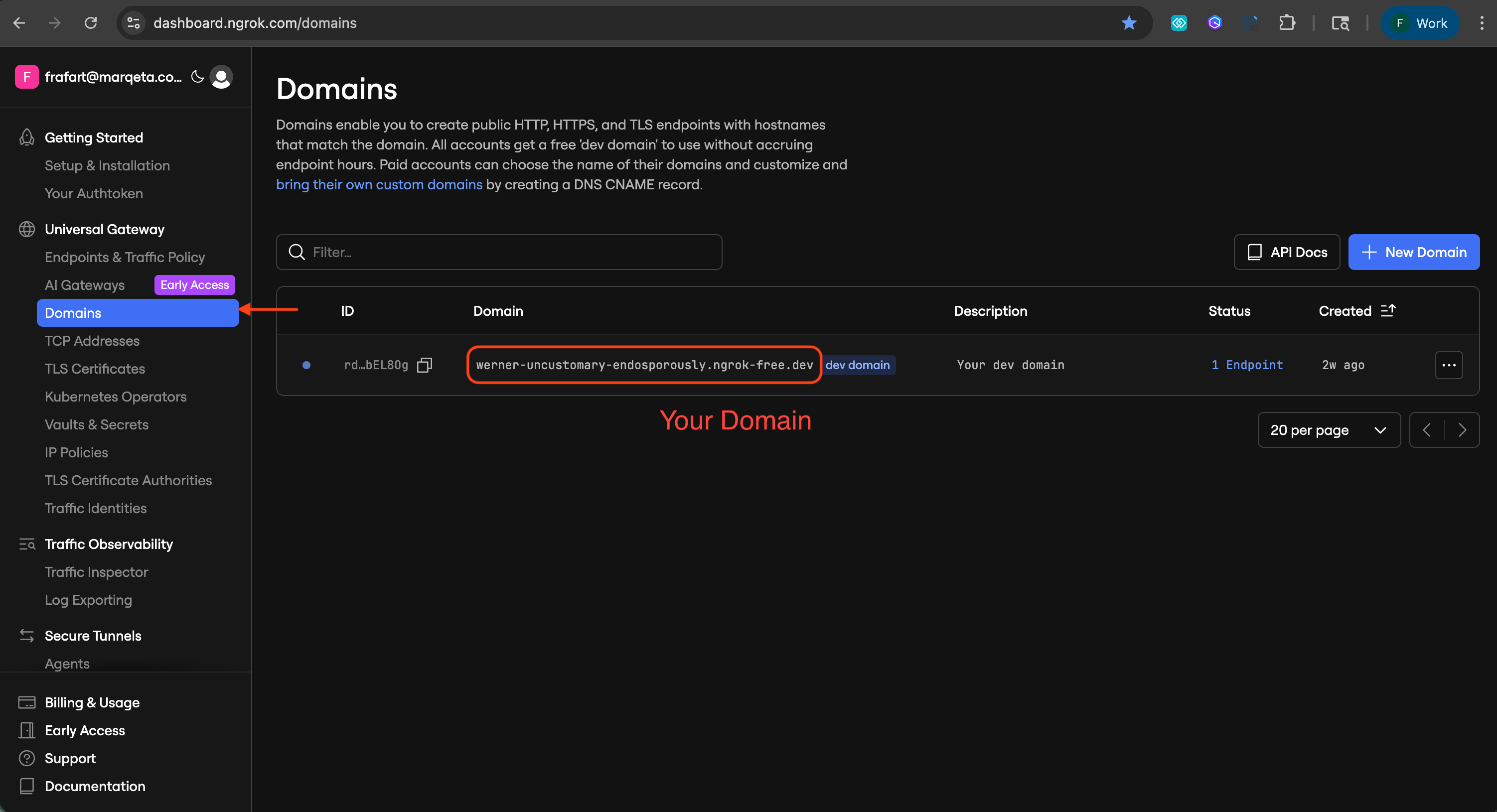
Find your unique domain in the ngrok dashboard.
This is the domain your local server will have on the public internet.
To download and run the app:
Download the Node JS Disputes webhook handler app by clicking [here](/assets/webhook-handler-app.zip). (ZIP file, 45 KB)
Install dependencies in the root directory using the command `npm install`.
Run the server locally with `npm run dev`
### Creating your own app to handle webhooks
If you do not want to use the Node JS Disputes webhook handler app, you can write your own code to implement a webhook handler app.
Your webhook handler must have a `POST` endpoint in a path of your choice, for example `/disputes`.
Send a `POST` request to this endpoint to complete setup of the Marqeta Webhook service.
### Listening for disputes events
For disputes handling, configure your endpoint to listen for these events:
```bash theme={null}
transaction.*
chargebacktransition.*
caseevent.*
casetransition.*
```
The `.*` wildcard subscribes your endpoint to all sub-events within each category.
When you configure your endpoint to listen for the events listed above, you will receive the following types of webhooks:
* **Transaction webhooks** -
Marqeta sends transaction webhooks whenever funds move between any entities on the Marqeta platform.
* **Chargeback transition webhooks** -
Marqeta sends chargeback transition webhooks during every state transition of a chargeback.
Marqeta triggers an event each time the status changes.
* **Case events webhooks** -
Case events represent actions that do not involve immediate money movement or standard status changes.
Examples include:
* Smart reject: When Marqeta rejects a transaction before it is submitted to the card network.
* Provisional credit: When a credit becomes permanent for Reg E cases.
* **Case transitions webhooks (optional)** -
These webhooks track internal state transitions from Marqeta.
They provide updates on case movements before a dispute is submitted to the card network.
This step is optional because your organization will initiate the API calls that trigger these transitions.
## Tunneling your server to the internet with ngrok
With your server running locally, you can expose it to the public internet by completing the following steps:
Create or sign in to your ngrok account and install the CLI.
Complete the initial steps in ngrok's [Setup Guide](https://ngrok.com/docs/getting-started).
Find your unique domain in the ngrok dashboard.
This is the domain your local server will have on the public internet.
 Run the command `ngrok http --url ` to expose your domain to the public internet.
Go to your ngrok domain in your browser to ensure your server is reachable.
ngrok displays a security warning.
Select **Visit Site**.
Run the command `ngrok http --url ` to expose your domain to the public internet.
Go to your ngrok domain in your browser to ensure your server is reachable.
ngrok displays a security warning.
Select **Visit Site**.
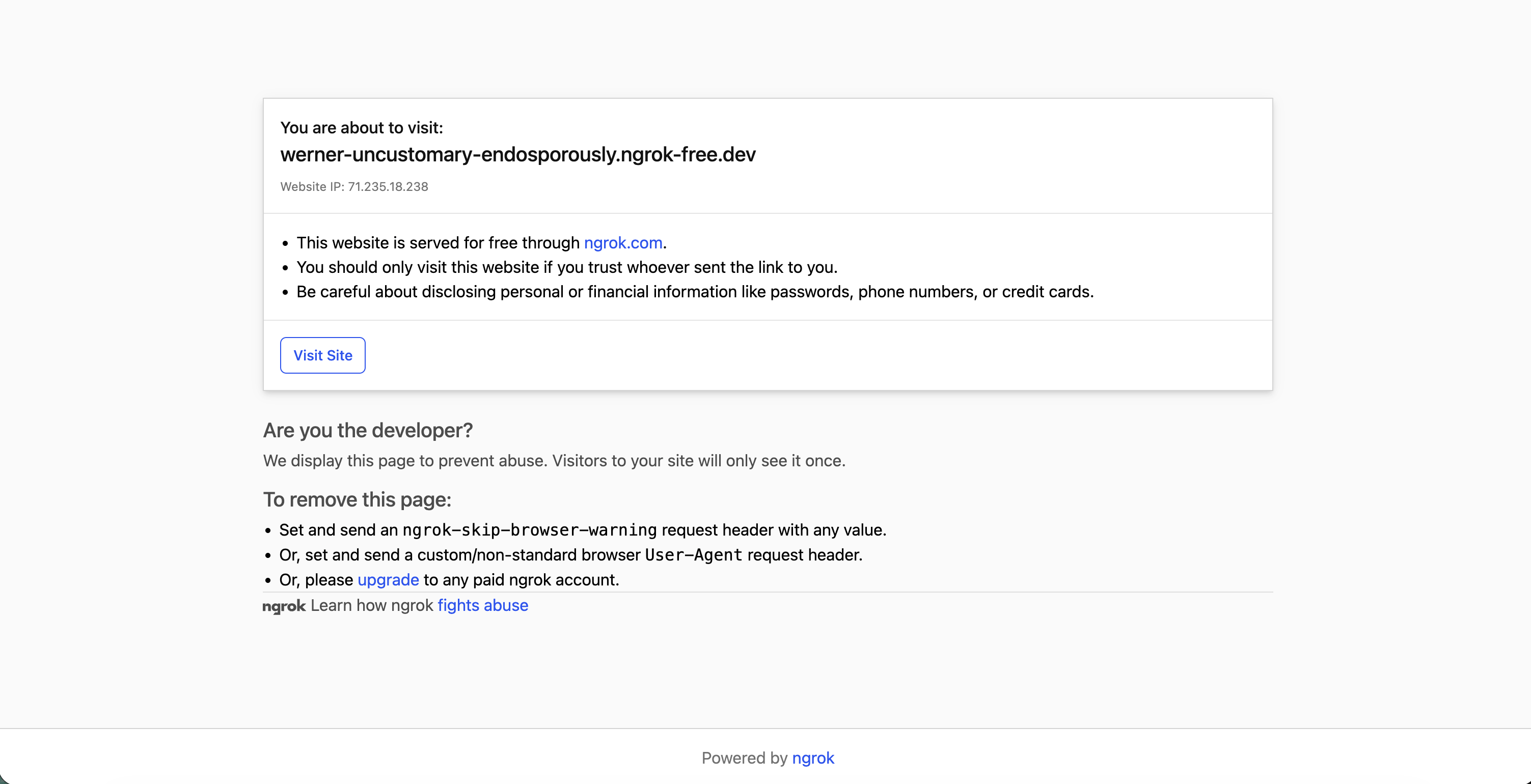 If you are using the boilerplate app, the message `Disputes webhook online!` appears in your browser.
## Submitting a webhook request
With your webhook handler app ready to receive requests from Marqeta, send a `POST` request to the `/webhooks` endpoint in your private sandbox environment.
### Sample request body
The `events` array in the examples below uses `"*"` to subscribe to all event types, which is convenient for sandbox testing.
In production, you can limit this to only the events your integration needs.
For disputes, use the following events:
```json theme={null}
["transaction.*", "chargebacktransition.*", "caseevent.*", "casetransition.*"]
```
**Important**
* Include the path to your `POST` endpoint in the `url`, not only your ngrok domain.
* A `secret` for request signatures is not required, but if you provide it you must also send a `signature_algorithm` as well. `HMAC_SHA_256` is recommended.
* Provide a `token` to identify the specific webhook.
Note the following before you use the sample request:
* If you are using a `secret` for request signatures, the `secret` must be 20–50 characters long.
* `basic_auth-password` must be 20–50 characters long.
```bash Curl theme={null}
curl -X POST "https://your-subdomain.marqeta.com/v3/webhooks" \
-H "X-Marqeta-Program-Short-Code: your-program-code" \
-H "Authorization: Basic YOUR_BASE64_ENCODED_STRING" \
-H "Content-Type: application/json" \
-d '{
"name": "disputes_test",
"active": true,
"config": {
"url": "https://your-ngrok-domain.ngrok-free.app/disputes",
"secret": "********************",
"signature_algorithm": "HMAC_SHA_256",
"basic_auth_username": "your_username",
"basic_auth_password": "********************"
},
"events": [
"*"
],
"token": "452fec74-7c8d-48b9-92ae-32737a9caa6e"
}'
```
```javascript JavaScript theme={null}
const webhookData = {
name: "disputes_test",
active: true,
config: {
url: "https://your-ngrok-domain.ngrok-free.app/disputes",
secret: "YOUR_WEBHOOK_SECRET",
signature_algorithm: "HMAC_SHA_256",
basic_auth_username: "your_username",
basic_auth_password: "YOUR_BASIC_AUTH_PASSWORD"
},
events: ["*"], // Subscribes to all event types
token: "452fec74-7c8d-48b9-92ae-32737a9caa6e"
};
fetch('https://your-subdomain.marqeta.com/v3/webhooks', {
method: 'POST',
headers: {
'X-Marqeta-Program-Short-Code': 'your-program-code',
'Authorization': 'Basic YOUR_BASE64_ENCODED_STRING',
'Content-Type': 'application/json'
},
body: JSON.stringify(webhookData)
})
.then(response => response.json())
.then(data => console.log('Webhook Configured:', data))
.catch(err => console.error('Error:', err));
```
```python Python theme={null}
import requests
url = "https://your-subdomain.marqeta.com/v3/webhooks"
headers = {
"X-Marqeta-Program-Short-Code": "your-program-code",
"Authorization": "Basic YOUR_BASE64_ENCODED_STRING",
"Content-Type": "application/json"
}
payload = {
"name": "disputes_test",
"active": True,
"config": {
"url": "https://your-ngrok-domain.ngrok-free.app/disputes",
"secret": "YOUR_WEBHOOK_SECRET",
"signature_algorithm": "HMAC_SHA_256",
"basic_auth_username": "your_username",
"basic_auth_password": "YOUR_BASIC_AUTH_PASSWORD"
},
"events": ["*"],
"token": "452fec74-7c8d-48b9-92ae-32737a9caa6e"
}
response = requests.post(url, headers=headers, json=payload)
print(response.json())
```
```java Java theme={null}
import java.net.URI;
import java.net.http.HttpClient;
import java.net.http.HttpRequest;
import java.net.http.HttpResponse;
public class ConfigureWebhook {
public static void main(String[] args) throws Exception {
HttpClient client = HttpClient.newHttpClient();
String jsonBody = """
{
"name": "disputes_test",
"active": true,
"config": {
"url": "https://your-ngrok-domain.ngrok-free.app/disputes",
"secret": "YOUR_WEBHOOK_SECRET",
"signature_algorithm": "HMAC_SHA_256",
"basic_auth_username": "your_username",
"basic_auth_password": "YOUR_BASIC_AUTH_PASSWORD"
},
"events": ["*"],
"token": "452fec74-7c8d-48b9-92ae-32737a9caa6e"
}
""";
HttpRequest request = HttpRequest.newBuilder()
.uri(URI.create("https://your-subdomain.marqeta.com/v3/webhooks"))
.header("X-Marqeta-Program-Short-Code", "your-program-code")
.header("Authorization", "Basic YOUR_BASE64_ENCODED_STRING")
.header("Content-Type", "application/json")
.POST(HttpRequest.BodyPublishers.ofString(jsonBody))
.build();
HttpResponse response = client.send(request, HttpResponse.BodyHandlers.ofString());
System.out.println("Status: " + response.statusCode());
System.out.println("Response: " + response.body());
}
}
```
After you save the configuration, Marqeta will begin sending notifications to your specified endpoint.
* A `secret` for request signatures is not required, but if you provide it you must also send a `signature_algorithm` as well. `HMAC_SHA_256` is recommended.
* Provide a `token` to identify the specific webhook.
### Sample response body
```json JSON theme={null}
{
"token": "452fec74-7c8d-48b9-92ae-32737a9caa6e",
"name": "disputes_test",
"active": true,
"config": {
"url": "https://.dev/disputes",
"secret": "M**********t",
"basic_auth_username": "f**********o",
"basic_auth_password": "M**********d",
"signature_algorithm": "HMAC_SHA_256",
"custom_header": {},
"use_mtls": false
},
"events": [
"*"
],
"created_time": "2026-03-02T16:25:24Z",
"last_modified_time": "2026-03-02T16:25:24Z"
}
```
Marqeta masks sensitive fields in the response — the asterisks in `secret`, `basic_auth_username`, and `basic_auth_password` are expected and indicate that the values were saved successfully.
## Testing the webhook handling app
You can test your webhook handling app by simulating a transaction.
Check your server logs to ensure your service receives the payload.
### Sample webhook log
```js theme={null}
{
transactions: [
{
type: 'authorization',
state: 'PENDING',
identifier: '7',
token: '019caffa-3a69-72ec-9bd8-ee37cfe14078',
user_token: 'f6c14295-e9af-463a-9acd-7b078e7c7e31',
acting_user_token: 'f6c14295-e9af-463a-9acd-7b078e7c7e31',
card_token: 'e25551b1-f47a-4310-a563-1a02cd09e0f7',
card_product_token: '902e55cb-f03d-4314-8214-413a746d27f0',
network_metadata: [Object],
is_recurring: false,
gpa: [Object],
gpa_order: [Object],
duration: 896,
created_time: '2026-03-02T19:15:37Z',
user_transaction_time: '2026-03-02T19:15:37Z',
settlement_date: '2026-03-02T00:00:00Z',
request_amount: 10.1,
amount: 10.1,
currency_conversion: [Object],
currency_code: 'USD',
approval_code: '987651',
response: [Object],
network: 'MASTERCARD',
acquirer_fee_amount: 0,
acquirer: [Object],
user: [Object],
card: [Object],
card_security_code_verification: [Object],
fraud: [Object],
issuer_received_time: '2026-03-02T19:15:37.704Z',
issuer_payment_node: '64cd45fb8656d9b4e71e8340652158c8',
network_reference_id: 'MPW1371272560302',
acquirer_reference_data: 'MPW137127256',
local_transaction_date: '2026-03-02T07:15:37Z',
digital_wallet_token_transaction_service_provider_info: {},
card_acceptor: [Object],
pos: [Object],
transaction_metadata: [Object]
}
]
}
```
## Related topics
- [Create, Submit, and Manage a Dispute](/docs/developer-guides/disputes-sandbox/disputes-sandbox-submit-manage.md)
- [Disputes Sandbox Overview](/docs/developer-guides/disputes-sandbox/disputes-sandbox-overview.md)
- [Webhooks](/docs/core-api/webhooks.md)
- [About Webhooks](/docs/developer-guides/about-webhooks.md)
- [Working with UX Toolkit within Native Webviews](/docs/developer-guides/uxt-within-native-webviews.md)
If you are using the boilerplate app, the message `Disputes webhook online!` appears in your browser.
## Submitting a webhook request
With your webhook handler app ready to receive requests from Marqeta, send a `POST` request to the `/webhooks` endpoint in your private sandbox environment.
### Sample request body
The `events` array in the examples below uses `"*"` to subscribe to all event types, which is convenient for sandbox testing.
In production, you can limit this to only the events your integration needs.
For disputes, use the following events:
```json theme={null}
["transaction.*", "chargebacktransition.*", "caseevent.*", "casetransition.*"]
```
**Important**
* Include the path to your `POST` endpoint in the `url`, not only your ngrok domain.
* A `secret` for request signatures is not required, but if you provide it you must also send a `signature_algorithm` as well. `HMAC_SHA_256` is recommended.
* Provide a `token` to identify the specific webhook.
Note the following before you use the sample request:
* If you are using a `secret` for request signatures, the `secret` must be 20–50 characters long.
* `basic_auth-password` must be 20–50 characters long.
```bash Curl theme={null}
curl -X POST "https://your-subdomain.marqeta.com/v3/webhooks" \
-H "X-Marqeta-Program-Short-Code: your-program-code" \
-H "Authorization: Basic YOUR_BASE64_ENCODED_STRING" \
-H "Content-Type: application/json" \
-d '{
"name": "disputes_test",
"active": true,
"config": {
"url": "https://your-ngrok-domain.ngrok-free.app/disputes",
"secret": "********************",
"signature_algorithm": "HMAC_SHA_256",
"basic_auth_username": "your_username",
"basic_auth_password": "********************"
},
"events": [
"*"
],
"token": "452fec74-7c8d-48b9-92ae-32737a9caa6e"
}'
```
```javascript JavaScript theme={null}
const webhookData = {
name: "disputes_test",
active: true,
config: {
url: "https://your-ngrok-domain.ngrok-free.app/disputes",
secret: "YOUR_WEBHOOK_SECRET",
signature_algorithm: "HMAC_SHA_256",
basic_auth_username: "your_username",
basic_auth_password: "YOUR_BASIC_AUTH_PASSWORD"
},
events: ["*"], // Subscribes to all event types
token: "452fec74-7c8d-48b9-92ae-32737a9caa6e"
};
fetch('https://your-subdomain.marqeta.com/v3/webhooks', {
method: 'POST',
headers: {
'X-Marqeta-Program-Short-Code': 'your-program-code',
'Authorization': 'Basic YOUR_BASE64_ENCODED_STRING',
'Content-Type': 'application/json'
},
body: JSON.stringify(webhookData)
})
.then(response => response.json())
.then(data => console.log('Webhook Configured:', data))
.catch(err => console.error('Error:', err));
```
```python Python theme={null}
import requests
url = "https://your-subdomain.marqeta.com/v3/webhooks"
headers = {
"X-Marqeta-Program-Short-Code": "your-program-code",
"Authorization": "Basic YOUR_BASE64_ENCODED_STRING",
"Content-Type": "application/json"
}
payload = {
"name": "disputes_test",
"active": True,
"config": {
"url": "https://your-ngrok-domain.ngrok-free.app/disputes",
"secret": "YOUR_WEBHOOK_SECRET",
"signature_algorithm": "HMAC_SHA_256",
"basic_auth_username": "your_username",
"basic_auth_password": "YOUR_BASIC_AUTH_PASSWORD"
},
"events": ["*"],
"token": "452fec74-7c8d-48b9-92ae-32737a9caa6e"
}
response = requests.post(url, headers=headers, json=payload)
print(response.json())
```
```java Java theme={null}
import java.net.URI;
import java.net.http.HttpClient;
import java.net.http.HttpRequest;
import java.net.http.HttpResponse;
public class ConfigureWebhook {
public static void main(String[] args) throws Exception {
HttpClient client = HttpClient.newHttpClient();
String jsonBody = """
{
"name": "disputes_test",
"active": true,
"config": {
"url": "https://your-ngrok-domain.ngrok-free.app/disputes",
"secret": "YOUR_WEBHOOK_SECRET",
"signature_algorithm": "HMAC_SHA_256",
"basic_auth_username": "your_username",
"basic_auth_password": "YOUR_BASIC_AUTH_PASSWORD"
},
"events": ["*"],
"token": "452fec74-7c8d-48b9-92ae-32737a9caa6e"
}
""";
HttpRequest request = HttpRequest.newBuilder()
.uri(URI.create("https://your-subdomain.marqeta.com/v3/webhooks"))
.header("X-Marqeta-Program-Short-Code", "your-program-code")
.header("Authorization", "Basic YOUR_BASE64_ENCODED_STRING")
.header("Content-Type", "application/json")
.POST(HttpRequest.BodyPublishers.ofString(jsonBody))
.build();
HttpResponse response = client.send(request, HttpResponse.BodyHandlers.ofString());
System.out.println("Status: " + response.statusCode());
System.out.println("Response: " + response.body());
}
}
```
After you save the configuration, Marqeta will begin sending notifications to your specified endpoint.
* A `secret` for request signatures is not required, but if you provide it you must also send a `signature_algorithm` as well. `HMAC_SHA_256` is recommended.
* Provide a `token` to identify the specific webhook.
### Sample response body
```json JSON theme={null}
{
"token": "452fec74-7c8d-48b9-92ae-32737a9caa6e",
"name": "disputes_test",
"active": true,
"config": {
"url": "https://.dev/disputes",
"secret": "M**********t",
"basic_auth_username": "f**********o",
"basic_auth_password": "M**********d",
"signature_algorithm": "HMAC_SHA_256",
"custom_header": {},
"use_mtls": false
},
"events": [
"*"
],
"created_time": "2026-03-02T16:25:24Z",
"last_modified_time": "2026-03-02T16:25:24Z"
}
```
Marqeta masks sensitive fields in the response — the asterisks in `secret`, `basic_auth_username`, and `basic_auth_password` are expected and indicate that the values were saved successfully.
## Testing the webhook handling app
You can test your webhook handling app by simulating a transaction.
Check your server logs to ensure your service receives the payload.
### Sample webhook log
```js theme={null}
{
transactions: [
{
type: 'authorization',
state: 'PENDING',
identifier: '7',
token: '019caffa-3a69-72ec-9bd8-ee37cfe14078',
user_token: 'f6c14295-e9af-463a-9acd-7b078e7c7e31',
acting_user_token: 'f6c14295-e9af-463a-9acd-7b078e7c7e31',
card_token: 'e25551b1-f47a-4310-a563-1a02cd09e0f7',
card_product_token: '902e55cb-f03d-4314-8214-413a746d27f0',
network_metadata: [Object],
is_recurring: false,
gpa: [Object],
gpa_order: [Object],
duration: 896,
created_time: '2026-03-02T19:15:37Z',
user_transaction_time: '2026-03-02T19:15:37Z',
settlement_date: '2026-03-02T00:00:00Z',
request_amount: 10.1,
amount: 10.1,
currency_conversion: [Object],
currency_code: 'USD',
approval_code: '987651',
response: [Object],
network: 'MASTERCARD',
acquirer_fee_amount: 0,
acquirer: [Object],
user: [Object],
card: [Object],
card_security_code_verification: [Object],
fraud: [Object],
issuer_received_time: '2026-03-02T19:15:37.704Z',
issuer_payment_node: '64cd45fb8656d9b4e71e8340652158c8',
network_reference_id: 'MPW1371272560302',
acquirer_reference_data: 'MPW137127256',
local_transaction_date: '2026-03-02T07:15:37Z',
digital_wallet_token_transaction_service_provider_info: {},
card_acceptor: [Object],
pos: [Object],
transaction_metadata: [Object]
}
]
}
```
## Related topics
- [Create, Submit, and Manage a Dispute](/docs/developer-guides/disputes-sandbox/disputes-sandbox-submit-manage.md)
- [Disputes Sandbox Overview](/docs/developer-guides/disputes-sandbox/disputes-sandbox-overview.md)
- [Webhooks](/docs/core-api/webhooks.md)
- [About Webhooks](/docs/developer-guides/about-webhooks.md)
- [Working with UX Toolkit within Native Webviews](/docs/developer-guides/uxt-within-native-webviews.md)