> ## Documentation Index
> Fetch the complete documentation index at: https://www.marqeta.com/docs/llms.txt
> Use this file to discover all available pages before exploring further.

# Managing User Profiles in the Marqeta Dashboard

> Learn about how to manage user profiles on the Marqeta platform.

<Warning>
  Marqeta is migrating dispute management to the new Disputes portal. To learn about the Disputes portal, see [About the Disputes Portal](/developer-guides/about-disputes-portal).
</Warning>

<Note>
  **Note**\
  For the previous version of User Profiles, see [User profiles](/developer-guides/control-center-dashboard/#_user_profiles).
</Note>

With User Profile Management, you can manage access to the Marqeta Dashboard. Depending on your permissions and access levels, the following tasks can be performed in User Profile Management:

* [View user information](/developer-guides/user-profiles-dashboard/#_viewing_user_information)

* [Add users](/developer-guides/user-profiles-dashboard/#_adding_users)

* [Resend an invitation](/developer-guides/user-profiles-dashboard/#_resending_an_invitation)

* [Edit a user’s information](/developer-guides/user-profiles-dashboard/#_editing_user_information)

* [Enable and disable users](/developer-guides/user-profiles-dashboard/#_enabling_and_disabling_users)

* [Manage multi-factor authentication](/developer-guides/user-profiles-dashboard/#_managing_multi_factor_authentication)

* [Enable single sign-on authentication](/developer-guides/user-profiles-dashboard/#_enabling_single_sign_on_authentication)

<h2 id="_viewing_user_information">
  Viewing user information
</h2>

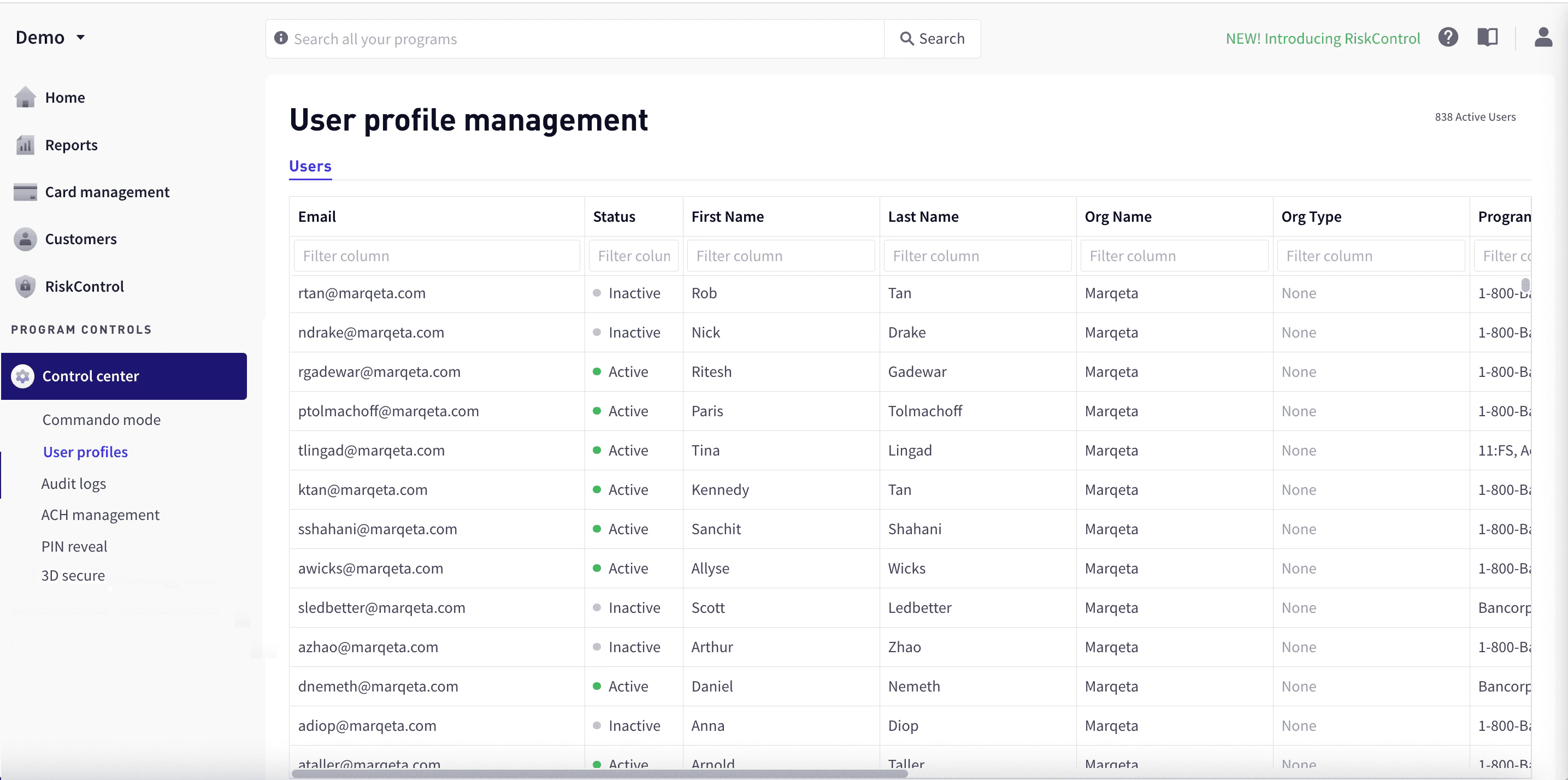
To view user information, go to **Control center > User profiles**.
<Frame>
  <img src="https://mintcdn.com/marqeta-b295cded/hYmh6YsXz54defql/images/docs/developer-guides/user-profiles-dashboard/dashboard_user_management_new.png?fit=max&auto=format&n=hYmh6YsXz54defql&q=85&s=aaec7d3e9b78359cb16fe430200f1bb3" alt="User profile management" width="2870" height="1428" data-path="images/docs/developer-guides/user-profiles-dashboard/dashboard_user_management_new.png" />
</Frame>

The **Users** tab lists current users along with the following information:

| Column       | Description                                                              |
| ------------ | ------------------------------------------------------------------------ |
| Email        | The user’s email address. An invitation to join is sent to this address. |
| Status       | The user’s status: Active or Disabled.                                   |
| First Name   | The user’s first name.                                                   |
| Last Name    | The user’s last name.                                                    |
| Org Name     | The user’s organization.                                                 |
| Org Type     | The type of organization, such as Customer, Bank, or Card Network.       |
| Programs     | Programs whose information the user can view.                            |
| Date Created | The date that the user was added.                                        |
| Date Updated | The most recent date that the user’s information was updated.            |

To view additional information, including permissions and access levels, select the user row to display the **User profile** popup window. For more information on user permissions, see [Permissions](#_permissions).

<h3 id="_filtering_by_column">
  Filtering by column
</h3>

To filter rows by column, enter the sequence of letters you want to filter on in the text box at the top of the column. As you type, the matching rows are filtered dynamically.

<h2 id="_adding_users">
  Adding users
</h2>

To add a user:

<Steps>
  <Step>
    In the upper-right corner of the dashboard, select **Add user**.
  </Step>

  <Step>
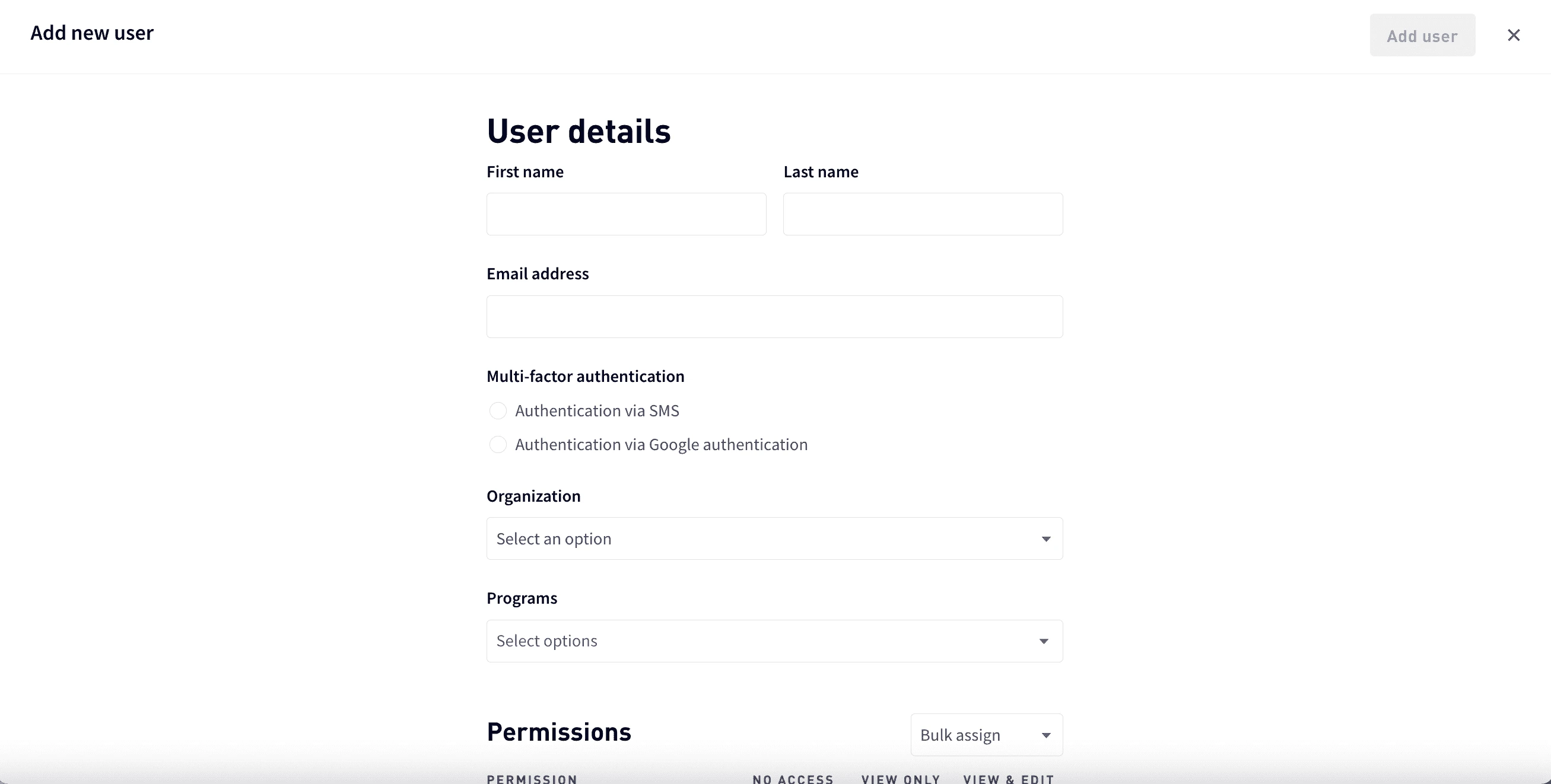
    In **User details**, enter the user’s first and last name and email.
    <Frame>
      <img src="https://mintcdn.com/marqeta-b295cded/hYmh6YsXz54defql/images/docs/developer-guides/user-profiles-dashboard/dashboard_user_profiles_add_user_info.png?fit=max&auto=format&n=hYmh6YsXz54defql&q=85&s=88a2e8ea4581734f8e53bd4c0557d2f0" alt="User profile" width="2614" height="1322" data-path="images/docs/developer-guides/user-profiles-dashboard/dashboard_user_profiles_add_user_info.png" />
    </Frame>
  </Step>

  <Step>
    For **Multi-factor authentication**, choose **Authentication via SMS** or **Authentication via Google authentication**. For more information, see [Managing multi-factor authentication](#_managing_multi_factor_authentication).
  </Step>

  <Step>
    Select the user’s organization and the programs the user can access.
  </Step>

  <Step>
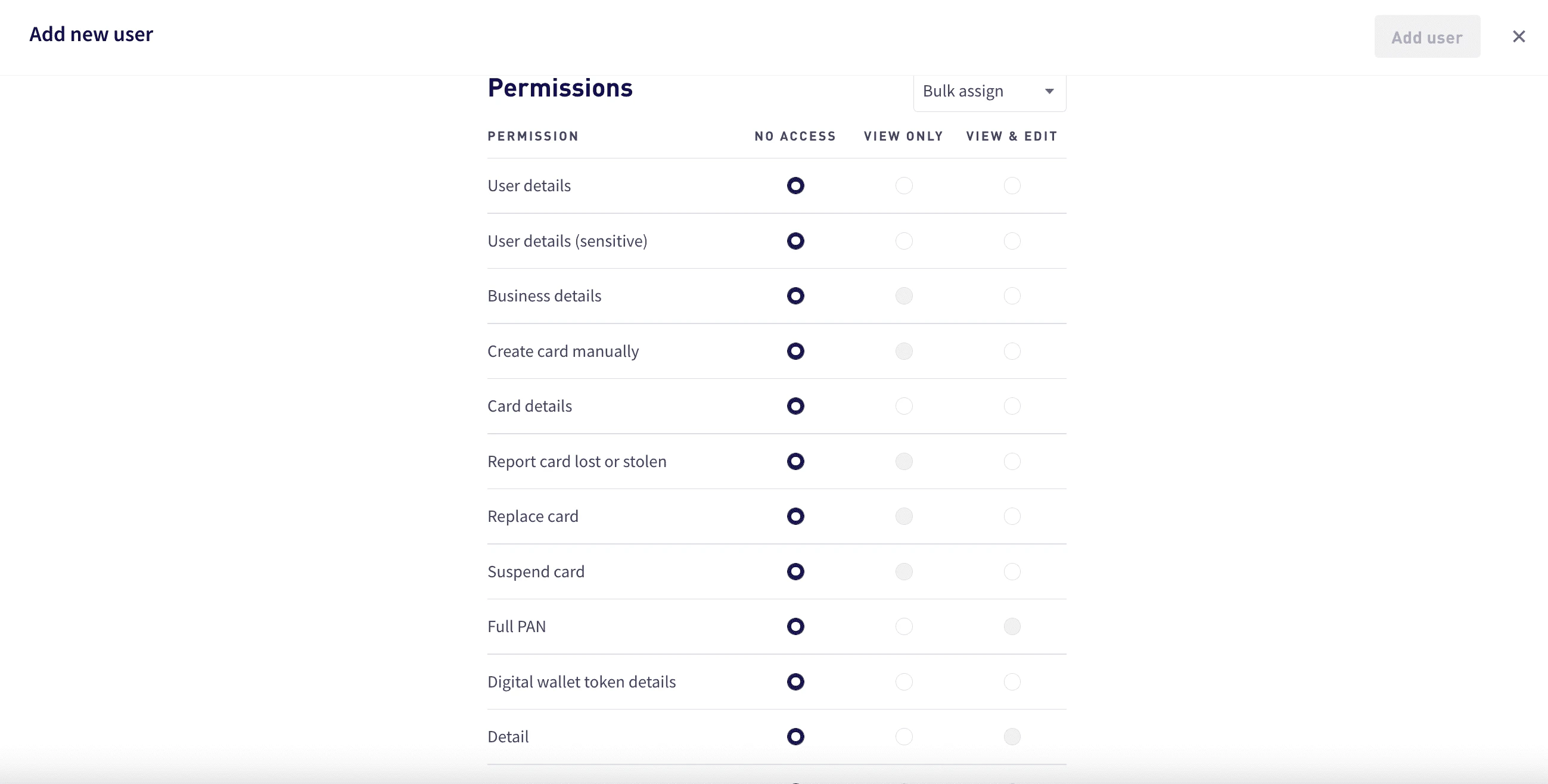
    To assign permissions, either assign an [access level](#_access_level_details) for each [permission](#_permissions) or use bulk assign:

    * For each permission, select an access level. Access levels that are not available for a permission are grayed.

    * For bulk assign, select **Bulk assign** and then select the access level for all permissions— **No access**, **View only**, or **View and edit**.
          <Frame>
            <img src="https://mintcdn.com/marqeta-b295cded/hYmh6YsXz54defql/images/docs/developer-guides/user-profiles-dashboard/dashboard_user_profiles_add_user_permissions.png?fit=max&auto=format&n=hYmh6YsXz54defql&q=85&s=1bd3c123ae599d1406715d0c67acce76" width="2598" height="1316" data-path="images/docs/developer-guides/user-profiles-dashboard/dashboard_user_profiles_add_user_permissions.png" />
          </Frame>
  </Step>

  <Step>
    Select **Add user**. The user receives an email invitation to join.
  </Step>
</Steps>

<Note>
  **Note**\
  By default, access to personally identifiable information (PII) is denied. Users should be granted the lowest level of access required to fulfill their job responsibilities. Access can only be granted with accordance to your company and the issuing bank’s privacy and information security policies. If a user needs access to PII, contact your Marqeta representative.
</Note>

<h2 id="_permissions">
  Permissions
</h2>

The following table shows the Marqeta Dashboard permissions and available access levels for each. For details on the specific access that each permission provides, see [Access level details](#_access_level_details).

| Permission                                                          | Available Access Levels | Available Access Levels | Available Access Levels |
| ------------------------------------------------------------------- | ----------------------- | ----------------------- | ----------------------- |
| **Card management**                                                 |                         |                         |                         |
| Card products                                                       | No access               | View only               | -                       |
| Create card manually                                                | No access               | -                       | View and edit           |
| Card details                                                        | No access               | View only               | View and edit           |
| Report card lost or stolen                                          | No access               | -                       | View and edit           |
| Replace card                                                        | No access               | -                       | View and edit           |
| Suspend card                                                        | No access               | -                       | View and edit           |
| **Control center**                                                  |                         |                         |                         |
| Invoke Commando Mode                                                | No access               | View only               | View and edit           |
| 3DS settings                                                        | No access               | View only               | View and edit           |
| Audit logs                                                          | No access               | View only               | -                       |
| **Customers**                                                       |                         |                         |                         |
| Marqeta Dashboard - Access Management                               | No access               | View only               | View and edit           |
| User details                                                        | No access               | View only               | View and edit           |
| User details (sensitive)                                            | No access               | View only               | View and edit           |
| Account holder details                                              | No access               | View only               | View and edit           |
| Account holder details (sensitive)                                  | No access               | View only               | View and edit           |
| Full account number                                                 | No access               | View only               | -                       |
| Manage ACHO transfers                                               | No access               | -                       | View and edit           |
| Cancel ACHO program funding                                         | No access               | -                       | View and edit           |
| Business details                                                    | No access               | View only               | View and edit           |
| Full primary account number (PAN) and card verification value (CVV) | No access               | View only               | -                       |
| Set personal identification number (PIN) (sensitive)                | No access               | -                       | View and edit           |
| ACH program funding                                                 | No access               | View only               | View and edit           |
| **Digital wallets**                                                 |                         |                         |                         |
| Digital wallet token details                                        | No access               | View only               | View and edit           |
| **Program controls**                                                |                         |                         |                         |
| Program configuration                                               | No access               | -                       | View and edit           |
| Granular permissions                                                | No access               | View only               | -                       |
| Inventory management                                                | No access               | -                       | View and edit           |
| **Reports**                                                         |                         |                         |                         |
| Analytics                                                           | No access               | View only               | -                       |
| Compliance                                                          | No access               | View only               | -                       |
| Detail                                                              | No access               | View only               | -                       |
| Cross border fees                                                   | No access               | View only               | -                       |
| Currency conversion fees                                            | No access               | View only               | -                       |
| Interchange                                                         | No access               | View only               | -                       |
| Stories                                                             | No access               | View only               | -                       |
| Personal identifiable information                                   | No access               | View only               | -                       |
| 3DS reporting                                                       | No access               | View only               | -                       |
| Commercial credit                                                   | No access               | View only               | -                       |
| Loads settlement date                                               | No access               | View only               | -                       |
| PIN interchange                                                     | No access               | View only               | -                       |
| **Risk Control**                                                    |                         |                         |                         |
| Transaction review manager                                          | No access               | -                       | View and edit           |
| Disputes                                                            | No access               | -                       | View and edit           |
| Process disputes (EU only)                                          | No access               | -                       | View and edit           |
| **Other**                                                           |                         |                         |                         |
| Return direct deposit                                               | No access               | -                       | View and edit           |

<h2 id="_access_level_details">
  Access level details
</h2>

The following table shows the specific access in the dashboard granted for each permission and access level:

| Permission                                | Access Level Details                                                                                                                                                                                                                                                                                                                                                                                                                                                                                                                                                                   |
| ----------------------------------------- | -------------------------------------------------------------------------------------------------------------------------------------------------------------------------------------------------------------------------------------------------------------------------------------------------------------------------------------------------------------------------------------------------------------------------------------------------------------------------------------------------------------------------------------------------------------------------------------- |
| **Card management**                       |                                                                                                                                                                                                                                                                                                                                                                                                                                                                                                                                                                                        |
| Card products                             | **View only** – Users with this permission can:<br /><br />- View all card products available in the program.<br />- View the card product details and spend controls for each card product in the program.                                                                                                                                                                                                                                                                                                                                                                            |
| Card details                              | **View only** – Users with this permission can:<br /><br />- View all information in the **Card Details** section except full PAN.<br />- View card transaction, history, card transitions, and digital wallet tokens summary.<br /><br />**View and edit** – Activate and terminate a card.                                                                                                                                                                                                                                                                                           |
| Report card lost or stolen                | **View and edit** – Complete the report card workflow for a lost or stolen card in the **Card Details** section.                                                                                                                                                                                                                                                                                                                                                                                                                                                                       |
| Replace card                              | **View and edit** – Complete the replace card workflow in the **Card Details** section.                                                                                                                                                                                                                                                                                                                                                                                                                                                                                                |
| Suspend card                              | **View and edit** – Complete the lock card workflow in the **Card Details** section.                                                                                                                                                                                                                                                                                                                                                                                                                                                                                                   |
| **Control center**                        |                                                                                                                                                                                                                                                                                                                                                                                                                                                                                                                                                                                        |
| Invoke Commando Mode                      | **View only** – View all Commando Mode configurations.<br /><br />**View and edit** – Enable or disable all available Commando Mode configurations for the program.                                                                                                                                                                                                                                                                                                                                                                                                                    |
| 3DS settings                              | **View only** – View 3DS settings and configurations for the program.<br /><br />**View and edit** – View the 3DS settings and edit the configurations for the program.                                                                                                                                                                                                                                                                                                                                                                                                                |
| Audit logs                                | **View only** – View Marqeta Dashboard user action history for the program.                                                                                                                                                                                                                                                                                                                                                                                                                                                                                                            |
| **Customers**                             |                                                                                                                                                                                                                                                                                                                                                                                                                                                                                                                                                                                        |
| Marqeta Dashboard - Access Management     | **View only** – Provides view access to the User Profile Management dashboard. Users with this permission can see a list of Marqeta Dashboard users.<br /><br />**View and edit** – In addition to viewing the **User Profile Management** dashboard, users with this permission can edit user profiles and permissions. Possible access includes the ability to:<br /><br />- Create user profiles with required permissions.<br />- Edit user profiles.<br />- Edit and reset multi-factor authentication.<br />- Assign permissions and programs to other dashboard users.          |
| User details                              | **View only** – Users with this permission can:<br /><br />- View all information in the **User Details** section except identification information.<br />- View the cardholder’s associated cards, digital wallet tokens, and transactions summary but not all the card details, token details, and transaction details.<br /><br />**View and edit** – Users with this permission can:<br /><br />- View and edit all information in the **User Details** section except identification information.<br />- Change status of the user and add notes.                                 |
| User details (sensitive)                  | **View only** – View all identification information in the **User Details** section.<br /><br />**View and edit** – View and edit all identification information in the **User Details** section.                                                                                                                                                                                                                                                                                                                                                                                      |
| Account holder details                    | **View only** – Users with this permission can:<br /><br />- View all information in the **Account Holder Details** section except personally identifiable information.<br />- View the account holder’s associated cards, digital wallet tokens, and transactions summary but not all the card details, token details, and transaction details.<br /><br />**View and edit** – Users with this permission can:<br /><br />- View and edit all information in the **User Details** section except personally identifiable information.<br />- Change status of the user and add notes. |
| Account holder details (sensitive)        | **View only** – View all information in the **Account Holder Details - Identification** section, including personally identifiable information.<br /><br />**View and edit** – View and edit all information in the **Account Holder Details - Identification** section, including personally identifiable information.                                                                                                                                                                                                                                                                |
| Full account number                       | **View only** – View all information in the **Account Holder Details - Identification** section, including personally identifiable information.                                                                                                                                                                                                                                                                                                                                                                                                                                        |
| Manage ACHO transfers                     | **View and edit** – View and edit all information in the **Account Holder Details - Identification** section, including personally identifiable information.                                                                                                                                                                                                                                                                                                                                                                                                                           |
| Cancel ACHO program funding               | **View and edit** – View previous ACH transfers and create new ACHO program funding transfers.                                                                                                                                                                                                                                                                                                                                                                                                                                                                                         |
| Business details                          | **View only** – Users with this permission can:<br /><br />- View all information in the **Business Details** section except sensitive information.<br />- View the business' associated child users, digital wallet tokens, and transactions summary but not all the user details and token details.<br /><br />**View and edit** – Users with this permission can:<br /><br />- View and edit most information in the **Business Details** section except for customers using KYB with Marqeta.<br />- Change status of the user and add notes.<br />- Add notes to the business.    |
| Full PAN and CVV                          | **View only** – View full PAN in the card art and the **Card Details** section.                                                                                                                                                                                                                                                                                                                                                                                                                                                                                                        |
| Set PIN (sensitive)                       | **View and edit** – Set PIN for all card in assigned programs.                                                                                                                                                                                                                                                                                                                                                                                                                                                                                                                         |
| ACH program funding                       | **View only** – View the ACH Program Funding page and the ACH Transfers table for the program.<br /><br />**View and edit** – View previous ACH transfers and create new ACHO program funding transfers.                                                                                                                                                                                                                                                                                                                                                                               |
| **Digital wallets**                       |                                                                                                                                                                                                                                                                                                                                                                                                                                                                                                                                                                                        |
| Digital wallet token details              | **View only** – View all information in the **Digital Wallet Tokens** section except full PAN.<br /><br />**View and edit** – Activate, suspend, and terminate digital wallet tokens.                                                                                                                                                                                                                                                                                                                                                                                                  |
| **Program controls**                      |                                                                                                                                                                                                                                                                                                                                                                                                                                                                                                                                                                                        |
| Program configuration                     | **View and edit** – Users with this permission can:<br /><br />- View and edit programs, card products, accepted countries, MCC groups, and application tokens.<br />- Edit and submit configurations to the Approval queue.                                                                                                                                                                                                                                                                                                                                                           |
| **Reports**                               |                                                                                                                                                                                                                                                                                                                                                                                                                                                                                                                                                                                        |
| Detail                                    | **View only** – View detailed transaction-level data in the **Reports** section.                                                                                                                                                                                                                                                                                                                                                                                                                                                                                                       |
| Cross border fees                         | **View only** – View cross border fees in the **Reports** section.                                                                                                                                                                                                                                                                                                                                                                                                                                                                                                                     |
| Currency conversion fees                  | **View only** – View currency conversion fees in the **Reports** section.                                                                                                                                                                                                                                                                                                                                                                                                                                                                                                              |
| Interchange                               | **View only** – View the `sig_interchange` and `chargebacks_interchange` columns in the **Clearing Detail** report.                                                                                                                                                                                                                                                                                                                                                                                                                                                                    |
| Stories                                   | **View only** – Create charts and visuals.                                                                                                                                                                                                                                                                                                                                                                                                                                                                                                                                             |
| Personally identifiable information (PII) | **View only** – View cardholders' personally identifiable information (PII).                                                                                                                                                                                                                                                                                                                                                                                                                                                                                                           |
| 3DS reporting                             | **View only** – View the 3DS ACS report.                                                                                                                                                                                                                                                                                                                                                                                                                                                                                                                                               |
| Commercial credit                         | **View only** – View credit balances by day and hour.                                                                                                                                                                                                                                                                                                                                                                                                                                                                                                                                  |
| **Risk Control**                          |                                                                                                                                                                                                                                                                                                                                                                                                                                                                                                                                                                                        |
| Transaction review manager                | **View and edit** – Review transactions and initiate transaction alerts.                                                                                                                                                                                                                                                                                                                                                                                                                                                                                                               |
| Disputes                                  | **View and edit** – Initiate disputes.                                                                                                                                                                                                                                                                                                                                                                                                                                                                                                                                                 |
| Process disputes (EU only)                | **View and edit** – Manage and process disputes.                                                                                                                                                                                                                                                                                                                                                                                                                                                                                                                                       |
| **Other**                                 |                                                                                                                                                                                                                                                                                                                                                                                                                                                                                                                                                                                        |
| Return direct deposit                     | **View and edit** – Reverse direct deposits.                                                                                                                                                                                                                                                                                                                                                                                                                                                                                                                                           |

<h2 id="_resending_an_invitation">
  Resending an invitation
</h2>

To resend an invitation:

<Steps>
  <Step>
    Go to **Control center > User profiles**, and select the row for the user.
  </Step>

  <Step>
    In the **User profile** pane, select **Resend Invite**.
  </Step>
</Steps>

<h2 id="_editing_user_information">
  Editing user information
</h2>

To edit a user’s information:

<Steps>
  <Step>
    Go to **Control center > User profiles**, and select the row for the user.
  </Step>

  <Step>
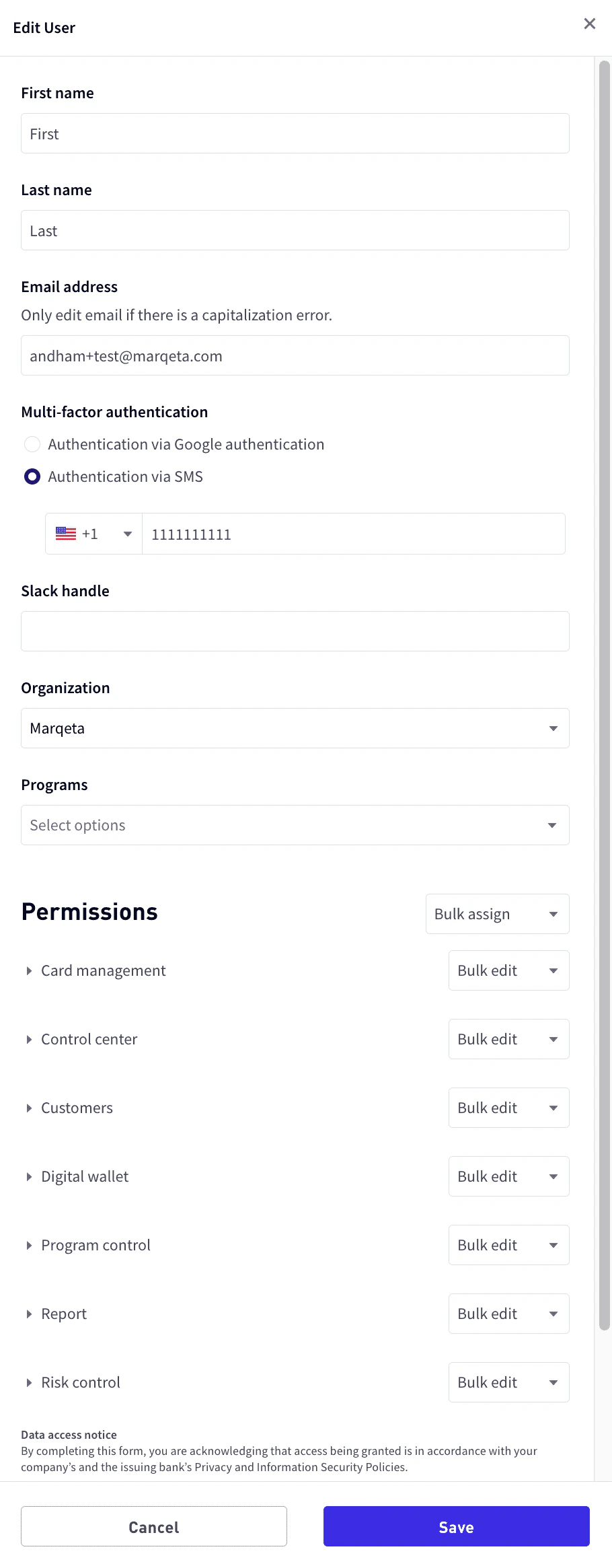
    At the bottom of the **User profile** pane, select **Edit user**.

    * Update any of the user’s basic information, or add and remove programs, permissions, or access levels as necessary. For more information, see [Permissions](#_permissions).
          <Frame>
            <img src="https://mintcdn.com/marqeta-b295cded/hYmh6YsXz54defql/images/docs/developer-guides/user-profiles-dashboard/dashboard_user_profiles_edit_user.png?fit=max&auto=format&n=hYmh6YsXz54defql&q=85&s=54249900e240bdf25ecb986b6d18797d" alt="Edit user" width="910" height="2330" data-path="images/docs/developer-guides/user-profiles-dashboard/dashboard_user_profiles_edit_user.png" />
          </Frame>
  </Step>

  <Step>
    Select **Save**.
  </Step>
</Steps>

<h2 id="_enabling_and_disabling_users">
  Enabling and disabling users
</h2>

To enable or disable a user:

<Steps>
  <Step>
    Go to **Control center > User profiles**, and select the row for the user.
  </Step>

  <Step>
    At the bottom of the **User profile** pane, select **Edit user**.
  </Step>

  <Step>
    For the **Status**, select **Active** or **Inactive**.
  </Step>

  <Step>
    Select **Save**.
  </Step>
</Steps>

<h2 id="_managing_multi_factor_authentication">
  Managing multi-factor authentication
</h2>

Multi-factor authentication (MFA) is an authentication method that requires the user to provide two or more verification factors to gain access. Marqeta Dashboard requires users to have MFA enabled via SMS or Google’s Time-based One Time Password (TOTP) authenticator.

To reset or manage a user’s MFA options, you must have the **View and Edit** access level for the **User Profiles** privilege.

<h3 id="_resetting_multi_factor_authentication">
  Resetting multi-factor authentication
</h3>

You should reset the user’s MFA when a user:

* Changes their phone number and needs to authenticate using a new phone number using SMS.

* Changes their mobile device and needs to authenticate using a new device with Google authenticator.

* Deletes their Google authenticator code and needs to rescan the QR code using the same device.

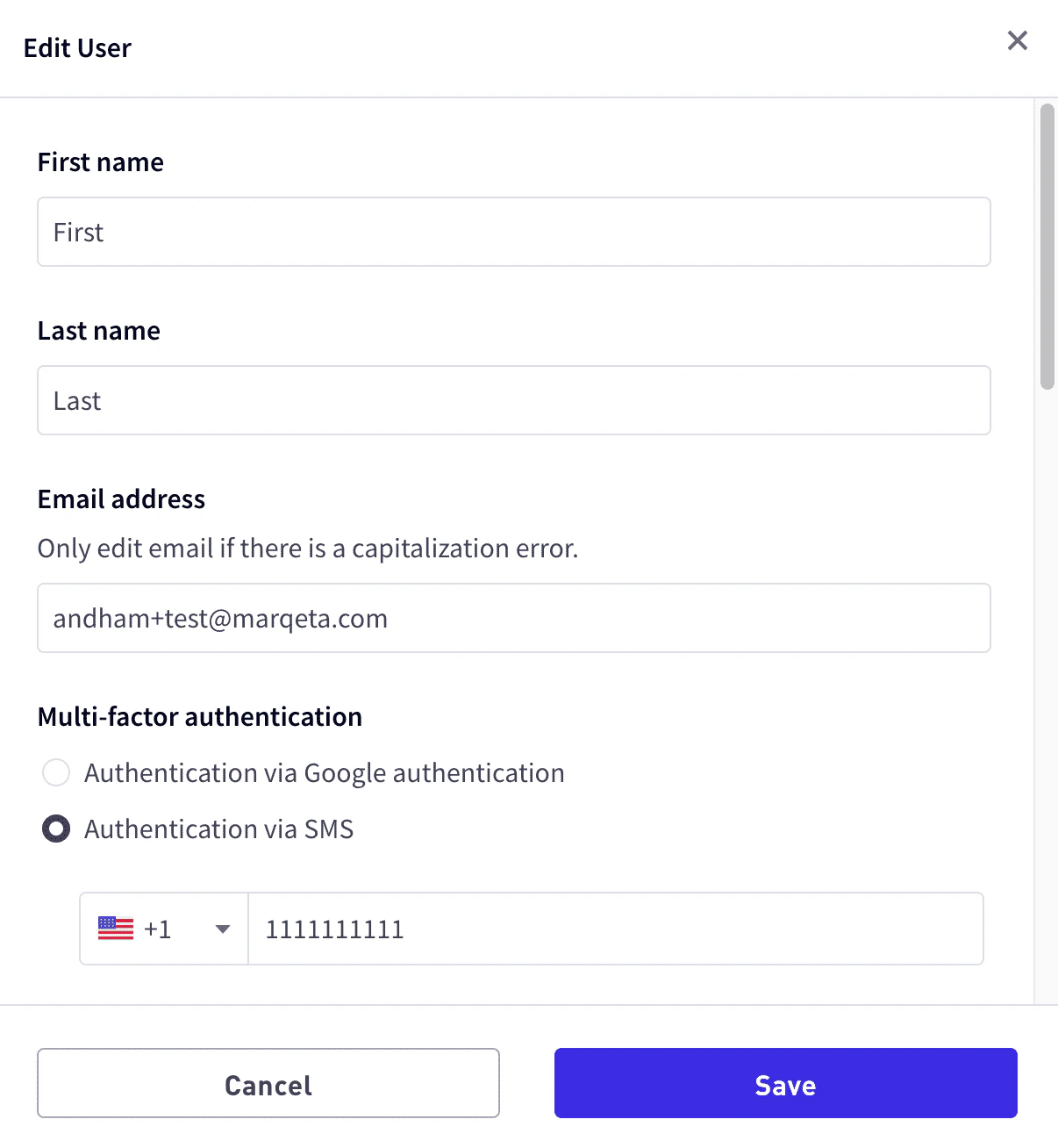
If SMS is chosen, resetting MFA clears the phone number and allows a new phone number to be entered for the user. If Google authenticator is chosen, resetting MFA redisplays the QR code.

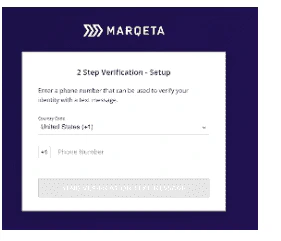
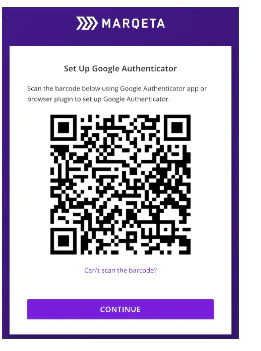
If the user had SMS MFA enabled and you’ve reset their MFA, the user is prompted to enter a new phone number when they sign in. If the user had Google Authenticator MFA enabled and you’ve reset their MFA, the QR code is displayed again for the user to scan.

To reset a user’s MFA:

<Steps>
  <Step>
    Go to **Control Center > User Profiles**.
  </Step>

  <Step>
    From the list of users, select the user’s row.
  </Step>

  <Step>
    At the bottom of the **User Profile** pane, select **Edit user** to open the **User profile** panel.
    <Frame>
      <img src="https://mintcdn.com/marqeta-b295cded/hYmh6YsXz54defql/images/docs/developer-guides/user-profiles-dashboard/dashboard_user_profiles_reset_mfa.png?fit=max&auto=format&n=hYmh6YsXz54defql&q=85&s=9ba5fc85ea4af0f98210d63f6663cf4d" alt="Edit user" width="1206" height="1308" data-path="images/docs/developer-guides/user-profiles-dashboard/dashboard_user_profiles_reset_mfa.png" />
    </Frame>
  </Step>

  <Step>
    In the **Multi-factor authentication** section, select either **Authentication via Google authentication** or **Authentication via SMS**.
  </Step>

  <Step>
    Select **Save**.
  </Step>
</Steps>

<h3 id="_switching_a_users_mfa_option">
  Switching a user’s MFA option
</h3>

A user’s MFA option can be switched between SMS and Google Authenticator. Switch a user’s MFA option when the user:

* Is not receiving SMS messages and would like to switch to Google Authenticator.

* Is an international user who doesn’t use a US phone number and has trouble receiving SMS.

* Would like to switch from SMS to Google Authenticator or switch from Google Authenticator to SMS.

To switch a user’s MFA option:

<Steps>
  <Step>
    Go to **Control center > User Profiles**.
  </Step>

  <Step>
    From the list of users, select the user’s row.
  </Step>

  <Step>
    At the bottom of the **User Profile** pane, select **Edit User**.
  </Step>

  <Step>
    In the **Multi-factor authentication** section, select either **Authentication via Google authentication** or **Authentication via SMS**.
  </Step>

  <Step>
    Select **Save**.
  </Step>
</Steps>

If the user had Google Authenticator enabled and has switched to SMS, the user will be prompted to enter a phone number when they sign in. If the user had SMS authentication enabled and has switched to Google Authenticator, the QR code will be displayed for the user to scan.

<h2 id="_accessing_the_dashboard_using_mfa">
  Accessing the Dashboard using MFA
</h2>

<Note>
  **Note**\
  This section describes how users can access the Marqeta Dashboard using multi-factor authentication.
</Note>

To access the Marqeta Dashboard, go to [app.marqeta.com](https://app.marqeta.com/) in your browser. If your organization has implemented multi-factor authentication (MFA), you are required to confirm your identity using either SMS or email when you log in. For SMS, you will need to enter the six-digit code that you receive on your phone into the login window. For Google Authenticator, you will need to follow the Google Authenticator process.

<h3 id="_resetting_your_mfa_access">
  Resetting your MFA access
</h3>

In some cases, your MFA access may need to be reset—for example, if your device has been lost or stolen. In that case, contact your system administrator to reset your MFA access.

<h4 id="_resetting_mfa_for_sms">
  Resetting MFA for SMS
</h4>

If you have SMS MFA enabled and have requested a reset:

<Steps>
  <Step>
    When you attempt to sign into the dashboard, you are prompted to enter a new phone number.
    <Frame>
      <img src="https://mintcdn.com/marqeta-b295cded/hYmh6YsXz54defql/images/docs/developer-guides/user-profiles-dashboard/dashboard_user_profile_mfa_sms.png?fit=max&auto=format&n=hYmh6YsXz54defql&q=85&s=198af0ee40d67d9c37cd913766f82282" alt="Reset SMS access" width="281" height="241" data-path="images/docs/developer-guides/user-profiles-dashboard/dashboard_user_profile_mfa_sms.png" />
    </Frame>
  </Step>

  <Step>
    Enter your phone number and select **SEND VERIFICATION TEXT MESSAGE**.
  </Step>
</Steps>

<h4 id="_resetting_mfa_for_google_authenticator">
  Resetting MFA for Google Authenticator
</h4>

If you have Google Authenticator MFA enabled and have requested a reset:

<Steps>
  <Step>
    When you attempt to sign into the dashboard, a QR code is displayed.
    <Frame>
      <img src="https://mintcdn.com/marqeta-b295cded/hYmh6YsXz54defql/images/docs/developer-guides/user-profiles-dashboard/dashboard_user_profile_mfa_goog.png?fit=max&auto=format&n=hYmh6YsXz54defql&q=85&s=c91b59ccdb9128f5772b9ecadd40450d" alt="Reset email access" width="261" height="351" data-path="images/docs/developer-guides/user-profiles-dashboard/dashboard_user_profile_mfa_goog.png" />
    </Frame>
  </Step>

  <Step>
    Scan the QR code and select **Continue**.
  </Step>
</Steps>

<h3 id="_switching_your_multi_factor_authentication_option">
  Switching your multi-factor authentication option
</h3>

If you want to switch your MFA option, send a request to your system administrator. You will be prompted to register using either the SMS or Google Authenticator procedure described above.

<h2 id="_enabling_single_sign_on_authentication">
  Enabling single sign-on authentication
</h2>

Single sign-on (SSO) is an authentication method that allows users to log in to multiple applications with one set of credentials. SSO reduces security overhead for system administrators by allowing users to delegate authentication to their external Security Assertion Markup Language 2.0 (SAML 2.0) Identity Provider (IdP) and eliminating the need for users to maintain a separate password to log in to Marqeta Dashboard.

When you enable SSO, SSO becomes the exclusive method for your users to log in to Marqeta Dashboard. SSO implementation is based on email domain, so after your email domain is onboarded to SSO, your new and existing users will be automatically provisioned for SSO. You will follow the existing process to [add a user in Marqeta Dashboard](/developer-guides/user-profiles-dashboard/#_adding_users). Your users will then [access Marqeta Dashboard using SSO](/developer-guides/user-profiles-dashboard/#_accessing_the_dashboard_using_sso).

If you are a system administrator and prefer your users use SSO, contact your Marqeta representative. Note that email aliases are not valid for SSO with Marqeta Dashboard. Users who use email aliases to access Marqeta Dashboard will lose access after SSO is enabled, so consult with your Marqeta representative if your organization includes such users.

<h3 id="_setting_up_single_sign_on_authentication">
  Setting up single sign-on authentication
</h3>

To set up SAML 2.0 authentication in Marqeta Dashboard:

<Steps>
  <Step>
    Share the service provider with your Marqeta representative.

    Marqeta will provide you with two URLs, one for SSO and another for audience restriction.
  </Step>

  <Step>
    Add the URLs to your IdP system, which will generate an IdP metadata URL.
  </Step>

  <Step>
    Share the IdP metadata URL with your Marqeta representative.

    Marqeta will update the service provider record with the IdP metadata URL.
  </Step>
</Steps>

<h2 id="_accessing_the_dashboard_using_sso">
  Accessing the Dashboard using SSO
</h2>

This section describes how users can access the Marqeta Dashboard using single sign-on (SSO) authentication.

<Note>
  **Note**\
  The Marqeta Dashboard does not currently support IdP-initiated login flows. Marqeta Dashboard users who log in with SSO methods cannot use the application link on their IdP dashboard to log in.
</Note>

To access the Marqeta Dashboard, go to [app.marqeta.com](https://app.marqeta.com/) in your browser. If your organization has implemented single sign-on (SSO) authentication, you are required to log in using SSO. You will be redirected from Marqeta Dashboard to your SSO login page to enter your credentials and authenticate. After successfully authenticating, you will be redirected back to Marqeta Dashboard. Note that email aliases are not valid for SSO with Marqeta Dashboard.


## Related topics

- [Managing Customers in the Marqeta Dashboard](/docs/developer-guides/customers-dashboard.md)
- [Managing Cards in the Marqeta Dashboard](/docs/developer-guides/cards-dashboard.md)
- [Updating Multi-Factor Authentication in the Marqeta Dashboard](/docs/developer-guides/mq-eu-mfa-in-mqd.md)
- [Control Center in the Marqeta Dashboard](/docs/developer-guides/control-center-dashboard.md)
- [Dashboard Overview and Quick Start](/docs/developer-guides/dashboard-overview-and-quick-start.md)
