

The Disputes portal is in early access. Contact your Marqeta representative to begin using the Disputes portal.
- What the Disputes portal is and what it does
- What a dispute case is and how it’s organized
- The key terms involved in the dispute lifecycle
- How cases move through different stages
- How the Disputes portal fits into the broader payments and reporting picture
What the Disputes portal does
The Disputes portal centralizes dispute resolution, allowing you to manage each dispute in one place with access to its details, history, and documentation. The platform provides the following core capabilities:- Case management — Track cases through each stage of the dispute lifecycle.
- Case visibility — View case details, transaction history, and documentation together.
- Investigation tools — Analyze disputes with tools for detailed case examination.
- Search and filtering — Locate specific cases and transactions.
- Reporting and insights — Monitor dispute performance and identify trends.
Dispute cases
A case is the central object in the Disputes portal. Each case represents one dispute and carries everything related to that dispute, such as the disputed transaction, the current state, supporting documents, activity history, and the case’s progression over time.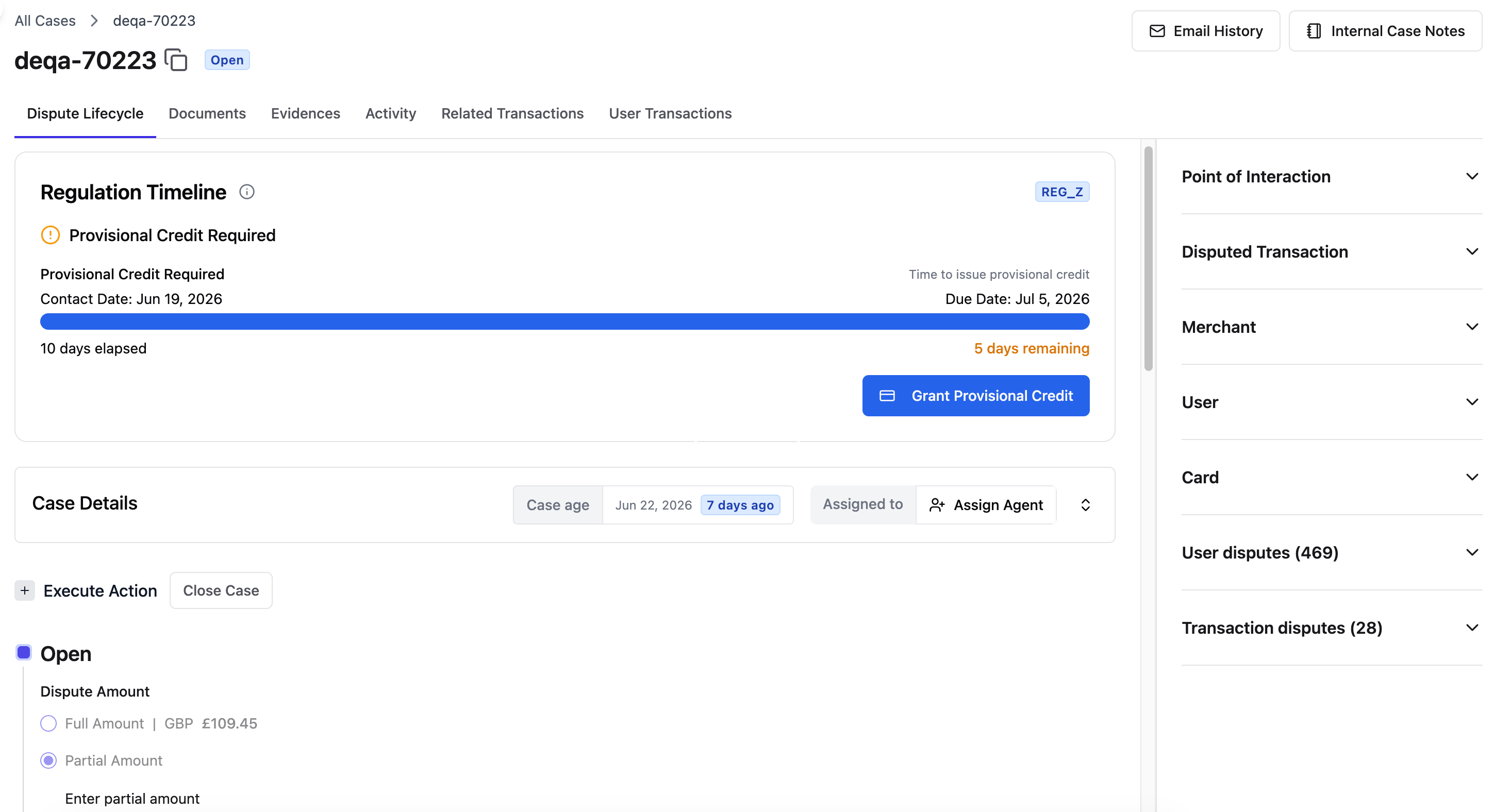
- Dispute Lifecycle — The main workspace for managing the case.
- Documents — Where you upload and review case files.
- Evidences — Where you upload evidence for the case.
- Activity — A history of every action taken on the case.
- Related Transactions — The complete transaction timeline, from authorization through chargeback.
- User Transactions — Transactions associated with the cardholder.
Key terms
The following describes recurring terms that are used throughout the Disputes portal:- Transaction token — The unique identifier for a transaction. You can use it to look up a transaction, create a dispute, and search for an existing case.
- Case token — The unique identifier for a dispute case. You can use it to locate a case directly.
- Dispute reason code — The card network reason code that classifies why a transaction is disputed.
- Transition — A movement of a case from one stage to the next. The Disputes portal records transitions in reverse chronological order so the most recent action appears first.
- Provisional credit — A temporary credit issued to the cardholder while a dispute is investigated. The Disputes portal tracks when provisional credit must be issued, how long it has been active, and when it becomes permanent.
- Loss reason — The reason selected when a case is closed as lost or withdrawn, accompanied by guidance and any required evidence.
How disputes are created
The Disputes portal supports several ways to create a dispute case. You can start from a transaction token, from a cardholder’s profile and their associated transactions, or from a card and the transactions made with it. Administrators can also create disputes in bulk for specific scenarios. To create a single dispute, choose a creation method:- Questionnaire — Creates the dispute through a step-by-step questionnaire. The guided questions determine the card network reason code automatically. This method is best for guided dispute creation when you need detailed prompts.
- Fraud only — Reports fraud without initiating a chargeback. This method is best for fraud reporting that doesn’t require immediate chargeback action.
How cases move through the lifecycle
The dispute lifecycle is the sequence of stages a case passes through from creation to closure. You advance a case by transitioning it, and the Disputes portal records each transition along with the evidence and documents attached at that point. For a full description of lifecycle stages, states, and network interactions, see About Disputes.How the Disputes portal fits the bigger picture
The Disputes portal sits downstream of the payments flow. A dispute begins with a transaction processed on the Marqeta platform, and the Related Transactions view ties a case back to the full transaction timeline, from authorization through clearing and chargeback. This connects the operational work of resolving a dispute to the same transaction data that developers integrate with through the Marqeta platform. On the reporting side, the Disputes portal includes dashboards that summarize dispute activity over time, such as case status, wins and losses, reject rate, dispute volume, and win rate by reason. These insights help teams monitor performance and prioritize process improvements.Related resources
- To learn how to create a dispute in the Disputes portal, see Creating a Dispute.
- To learn how to filter and search for dispute cases, see Finding and Organizing Cases.
- To learn how to navigate and work within a dispute case, see Working Within a Case.
- To learn how to transition dispute cases, see Transitioning Cases.
- To learn about the reporting and insights available in the Disputes portal, see Reporting and Insights.